Fitting multiple CPU cores onto a single piece of silicon requires three key hardware solutions:
Fitting multiple CPU cores onto a single piece of silicon requires three key hardware solutions:
==== 1. Physical Layout on the Silicon Die ====
'''1. Physical Layout on the Silicon Die'''
* '''Photolithography:''' Millions (or billions) of microscopic transistors are etched directly into one continuous piece of silicon using light. A modern 4-core, 8-core, or 16-core chip simply etches several complete CPU processing units side-by-side on that same slice of silicon.
* '''Photolithography:''' Millions (or billions) of microscopic transistors are etched directly into one continuous piece of silicon using light. A modern 4-core, 8-core, or 16-core chip simply etches several complete CPU processing units side-by-side on that same slice of silicon.
* '''Monolithic vs. Chiplets:'''
* '''Monolithic vs. Chiplets:'''
** ''Monolithic Design:'' All cores, memory controllers, and caches are etched onto one single slab of silicon (common in laptops and smartphones).
** ''Monolithic Design:'' All cores, memory controllers, and caches are etched onto one single slab of silicon (common in laptops and smartphones).
** ''Chiplet Design:'' Several smaller silicon tiles (each containing multiple cores) are placed on the same fiberglass substrate and connected via microscopic high-speed bridges (popularized by AMD Ryzen and modern enterprise chips).
** ''Chiplet Design:'' Several smaller silicon tiles (each containing multiple cores) are placed on the same fiberglass substrate and connected via microscopic high-speed bridges (popularized by AMD Ryzen and modern enterprise chips).
'''2. Shared Memory and On-Chip Interconnects'''
==== 2. Shared Memory and On-Chip Interconnects ====
If cores were completely isolated, they couldn't coordinate. They share space and communicate using an on-chip network:
If cores were completely isolated, they couldn't coordinate. They share space and communicate using an on-chip network:
Line 481:
Line 480:
** All cores share a larger, central memory block on the same die (the '''L3 cache'''), allowing them to pass data without having to travel across the motherboard to the main RAM.
** All cores share a larger, central memory block on the same die (the '''L3 cache'''), allowing them to pass data without having to travel across the motherboard to the main RAM.
* '''Data Highways (Interconnects):''' Cores are linked together by on-chip microscopic "highways" (such as a circular **Ring Bus** or a **Grid/Mesh network**) that let them swap information in nanoseconds.
* '''Data Highways (Interconnects):''' Cores are linked together by on-chip microscopic "highways" (such as a circular **Ring Bus** or a **Grid/Mesh network**) that let them swap information in nanoseconds.
'''3. Coordinated Execution (The Role of the OS)'''
==== 3. Coordinated Execution (The Role of the OS) ====
To the computer's operating system (Windows, macOS, Linux), each hardware core appears as a distinct processor:
To the computer's operating system (Windows, macOS, Linux), each hardware core appears as a distinct processor:
Before computing machines existed as physical objects of brass, vacuum tubes, or etched silicon, they existed as a pressing intellectual and logistical necessity. The history of computing hardware is fundamentally the story of humanity building prosthetics for the human mind, externalizing calculation, memory, and logic to overcome innate biological constraints.
1. The cognitive bottleneck and human fallibility
Human working memory is biologically limited: the brain struggles to track more than a few transient symbols, carries, and intermediate sums simultaneously without exponential error rates.
The cognitive tax of monotony: High-precision calculation requires repetitive, deterministic execution over long durations. Human psychology is poorly adapted to such monotony; fatigue, distraction, and cognitive drift inevitably introduce subtle arithmetic mistakes.
Cascading error propagation: In iterative mathematics, such as computing navigation tables, astronomical ephemerides, or ballistic trajectories, a single transcription or carrying error in step two renders every subsequent calculation down to step ten thousand completely invalid.
The "Human Computer": Prior to the 1940s, the word computer designated a job title, not an apparatus. Scores of human clerks, mostly women, performed day-long arithmetic by hand. As late as the 18th and 19th centuries, government and maritime navigation tables were notorious for errata pages that were themselves riddled with new errors introduced during manual typesetting. As Charles Babbage famously lamented in 1821 while reviewing flawed astronomical tables:
"I wish to God these calculations had been executed by steam!"
2. The problems computing solved: From survival to scale
Computing machinery emerged not out of abstract curiosity, but under the acute pressure of societal scale and physical survival:
Navigational safety and global trade (17th–19th Century):
Maritime commerce and naval dominance depended entirely on accurate celestial navigation. Calculating longitude required precise tables of lunar distances and solar positions. A five-arcminute error in a printed navigational table could throw a ship off course by hundreds of miles, resulting in shipwrecks and catastrophic loss of life and cargo.
The crisis of demographic and administrative scale (Late 19th Century):
Industrialization created administrative structures far too vast for manual bookkeeping. By 1890, the United States Census Bureau was on track to take more than a decade to tally the national census by hand, meaning the results would be obsolete before completion. The invention of the punch-card tabulating machine by Herman Hollerith cut the processing time to months, demonstrating that modern bureaucratic societies could not govern or tax without automated data processing.
Ballistics, cryptanalysis, and military urgency (World War II):
The emergence of modern warfare created mathematical problems that had to be solved faster than real-time:
Calculating firing tables for artillery that factored in wind speed, barrel wear, and air temperature.
Cracking encrypted military communications (such as the German Enigma and Lorenz ciphers) required testing thousands of permutations per second, giving rise to mechanical and electronic cryptanalytic engines like the Polish Bomba, Alan Turing’s Bombe, and the British Colossus.
Modeling nuclear chain reactions for the Manhattan Project demanded millions of interdependent partial differential equations, directly accelerating the development of stored-program electronic mainframes like ENIAC.
3. The human dimension: automating the machine within us
A profound paradox in the history of technology is that computing did not begin by automating human thought; it began by automating human mechanical compliance.
Manual arithmetic, book balancing, and table lookup do not require creative consciousness, they require rigid obedience to algorithmic rules. By delegating purely repetitive, procedural algorithms to physical machines, society achieved two transformative shifts:
Liberating intellect from drudgery: Scientists, engineers, and thinkers were freed from spending entire lifetimes acting as mechanical adders, enabling them to focus on high-level hypothesis formulation, architectural design, and conceptual reasoning.
decoupling truth from sensory limits: Human senses perceive reality on immediate, macro timescales. Modern computational machines can simulate phenomena inaccessible to unassisted human experience: quantum interactions inside atoms, tectonic shifts spanning millions of years, and cosmological modeling of galactic collisions.
Hardware history is therefore not merely a lineage of physical gadgets, but the progressive externalization of human reason into physical matter.
Era 0: Pre-mechanical calculation and early automata (Antiquity-1830s)
Computing has evolved along two parallel paths:
Foundational calculation tools
Before mechanical gears were introduced, human calculation was heavily bottlenecked by working memory, specifically the cognitive load of tracking intermediate sums, carrying tens, and executing multi-step multiplication. Early tools were designed not to automate thought, but to serve as external, physical registers and lookup systems.
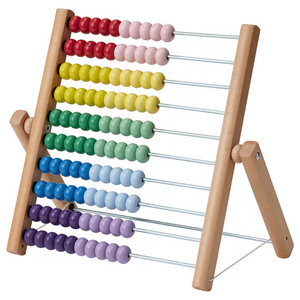
The Abacus (c. 2700-500 BCE): Positional memory register
How it works: Rather than calculating on its own, an abacus acts as an external physical register. Beads arranged on parallel rods or grooves represent specific decimal place values (units, tens, hundreds, thousands).
Cognitive relief: The user executes mental arithmetic rules, but never needs to hold multi-digit numbers or carries in short-term memory; the physical position of the pushed beads instantly stores the current state and intermediate results.
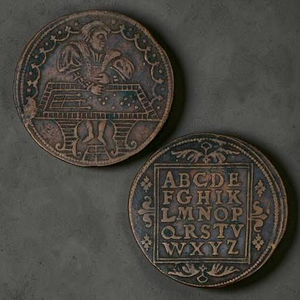
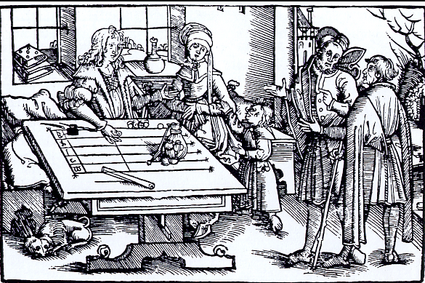
The counting board and jetons (Medieval to renaissance Europe, c. 1100-1600s) - Positional grid computation
How it works: Rather than beads permanently fixed on wires, European merchants and money-changers used a flat wooden table or cloth marked with parallel lines representing powers of ten (or British pounds, shillings, and pence). Calculations were performed by physically placing, sliding, and clearing metal cast counters called jetons.
Cognitive relief: It allowed rapid commercial accounting in Roman-numeral Europe without requiring written scratch paper. By turning complex currency conversions into physical movement of tokens across labeled lines, the clerk avoided mental carrying mistakes. counting board and jetonsboard and jetons table
Historical context: Why physical aids preceded pen-and-paper calculation
While performing arithmetic with pen, paper, and written digits seems fundamental today, dynamic calculation using scratch paper was impractical for most of human history due to economic, linguistic, and cognitive barriers:
Scarcity and cost of writing media: Prior to industrial wood-pulp papermaking in the 19th century, writing surfaces such as papyrus, vellum (animal skin), and rag paper were costly commodities reserved for legal deeds, state censuses, and holy texts. Wasting consumable sheets on intermediate scratch work and discarded calculations was financially prohibitive. Physical instruments like the abacus, counting boards, or sliding rules could be reset indefinitely without consuming materials.
Limitations of pre-positional numeral systems: Western commerce historically operated under Roman numerals (I, V, X, L, C, D, M), which lacked a zero and place-value notation. Attempting to perform multi-digit multiplication or long division symbolically on paper using Roman numerals is exceptionally difficult. As a result, computation was handled externally on physical lines (using stones or tokens called jetons), and paper was used exclusively at the very end to record the final sum.
High barrier of mathematical literacy: Even after the Hindu-Arabic positional decimal system was popularized in Europe via Fibonacci's Liber Abaci (1202), written algorithmic arithmetic ("algorism") remained an elite academic skill taught in specialized guild schools. Tactile counting frames allowed merchants and apprentices to compute rapidly through physical rules without needing advanced arithmetic literacy.
Human working memory and error propagation: Long multi-digit manual arithmetic forces the human brain to simultaneously recall multiplication tables, track running carry values, and transcribe staggered sums, each step introducing points of human failure. Physical tools effectively externalized cognitive registers:
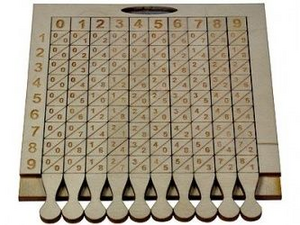
Napier's Bones physically encoded the multiplication table, converting multi-digit operations into simple diagonal single-digit additions.
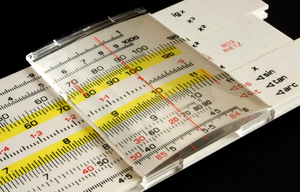
The Slide Rule converted algebraic multiplication and division into continuous spatial distances, allowing an engineer to obtain multi-digit approximations in seconds without performing a single written calculation.
Functional division: Pen-and-paper vs. physical calculation aids
Factor
Pen-and-Paper Arithmetic
Physical Calculation Aids
Resource model
Consumable (ink, parchment, or rag paper spent per calculation)
Advanced numeracy, literacy, and memorized carrying algorithms
Simple tactile motion rules; functional across different languages/scripts
Primary historical role
Static storage: Preserving final results, deeds, and ledgers
Dynamic processing: Real-time arithmetic and intermediate state tracking
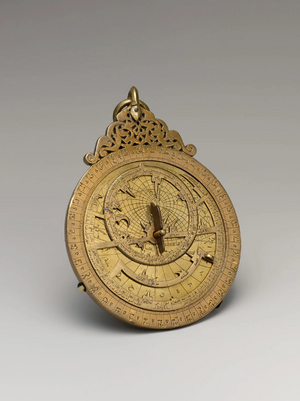
The Astrolabe (c. 400-1500s) - Two-dimensional analog celestial calculator
How it works: Highly refined by Islamic Golden Age astronomers and mathematicians, the planispheric astrolabe mapped the 3D celestial sphere onto a flat, rotating brass coordinate plate (stereographic projection).
Cognitive relief: Instead of solving complex spherical trigonometry formulas by hand, navigators and astronomers could solve local solar time, twilight, prayer hours, and planetary positions in seconds by aligning sighting pointers on the brass plate with the observed altitude of a star or the sun.Astrolabio
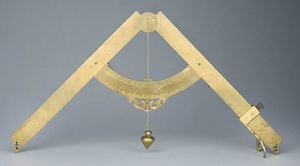
The Sector or Proportional Compass (c. 1560) - Geometrical proportional calculator
How it works: Developed independently by inventors such as Fabrizio Mordente, Guidobaldo del Monte, and perfected by Galileo Galilei, the sector consisted of two hinged brass arms marked with calibrated scales (arithmetic, geometric, trigonometric).
Cognitive relief: Using the geometric theorem of similar triangles and a simple pair of dividers, operators could calculate proportions, scale drawings, compute gunnery trajectories, and extract square or cube roots mechanically without performing manual long-hand arithmetic.Proportional compass
Napier’s Bones (1617) - Lattice multiplication on rods
How it works: Invented by Scottish mathematician John Napier, this tool consists of a set of indexed wooden, bone, or ivory rods inscribed with multiplication tables. Each square on a rod is divided by a diagonal line separating tens from units (the basis of lattice or "gelosia" multiplication).
Cognitive relief: To multiply a complex number (e.g., 425 × 7), the operator simply arranges the rods labeled 4, 2, and 5 side by side. Reading across row 7, the multiplication is instantly converted into simple, low-effort diagonal additions of adjacent digits, completely eliminating the need to memorize or look up multiplication tables.
The Slide Rule (1622): Logarithmic analog computation:
How it works: Developed by William Oughtred and others shortly after Napier defined mathematical logarithms, the slide rule places logarithmic scales onto sliding linear rules.
Cognitive relief: Because logarithms translate multiplication into addition (log(a · b) = log a + log b) and division into subtraction, a user can multiply or divide two numbers simply by aligning sliding physical distances. The operator offloads difficult calculation to a fast, visual spatial alignment, yielding results accurate to three or four significant digits.slide rule oughtred
Mechanical calculating machines
Designed to automate calendar cycles, astronomical tracking, and arithmetic carry operations.
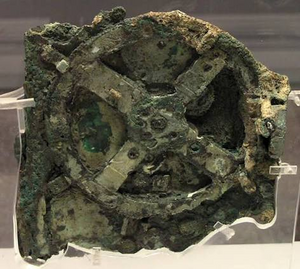
Antikythera mechanism (c. 150-100 BCE): An ancient Greek bronze mechanism comprising over 30 intricate differential gears. Used to track and predict lunar phases, solar cycles, Olympiads, and eclipses, it represents the earliest known geared analog computing device.antikythera
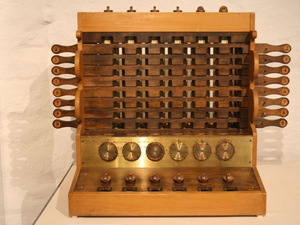
Schickard's calculating clock (1623): German polymath Wilhelm Schickard designed the earliest documented mechanical calculator using linked gear wheels and single-tooth trip mechanisms to automate multi-digit addition and subtraction.schickards calculating clockhttps://www.youtube.com/shorts/vi_33gmJoBU
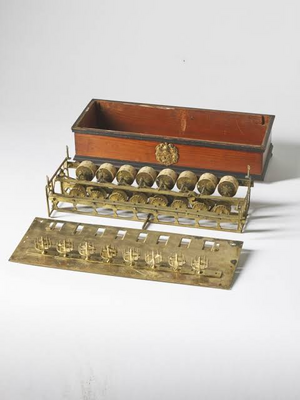
Pascal's Pascaline (1642): Built by Blaise Pascal to aid his father in taxation records, the Pascaline became the first widely recognized, operational mechanical adder. Its central breakthrough was the sautoir, a gravity-weighted pawl mechanism that reliably handled multi-dial tens carry operations.Pascal's pascaline
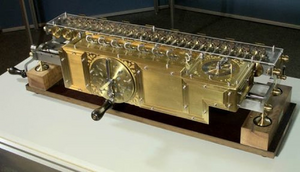
Leibniz's Stepped Reckoner (1673): Gottfried Wilhelm Leibniz introduced the stepped gear cylinder (the Leibniz wheel), enabling a mechanical machine to perform direct multiplication and division alongside addition and subtraction. Leibniz was also the first to systematically document the modern binary number system (1679).Leibniz reckoner
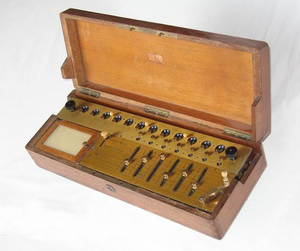
Thomas de Colmar's Arithmometer (1820): The first mechanically reliable, commercially manufactured calculator capable of daily office use, bringing four-function desktop calculation into mass adoption across finance and engineering.Colmar arithmometer
The Jacquard Loom (1804): The dawn of stored instruction In 1804, French weaver Joseph Marie Jacquard revolutionized textile production by automating loom operations through punched card chains. Perforated holes in stiff cards mechanically determined whether individual warp threads were lifted or lowered. While not designed for mathematical computation, Jacquard’s invention demonstrated the principle of external programmability, the ability to change the machine's task dynamically by feeding it a new set of interchangeable cards without modifying the underlying physical machinery. This directly inspired Charles Babbage’s design for the Analytical Engine's card-reading mechanism. https://www.youtube.com/watch?v=pzYucg3Tmho
Jacquard loom
Comparison of Era 0 computing devices
Device / System
Primary Inventor / Origin
Operating Era
Working Principle
Historical Significance
Antikythera mechanism
Ancient Greece
c. 150-100 BCE
Bronze gear trains and differential dials
Earliest known astronomical analog calculator.
Napier's Bones & Slide Rule
John Napier / William Oughtred
1617-1622
Logarithmic scales
Replaced manual multi-digit multiplication with addition.
Pascaline
Blaise Pascal
1642
Interlinked dial gears with gravity-assisted sautoir
First practical mechanical decimal adder with automated carries.
Stepped Reckoner
Gottfried Wilhelm Leibniz
1673
Fluted stepped drum (Leibniz wheel)
Expanded mechanical arithmetic to direct multiplication and division.
Jacquard loom
Joseph Marie Jacquard
1804
Perforated pasteboard punched-card chains
Pioneered external data storage and mechanical execution control.
Arithmometer
Thomas de Colmar
1820
Refined stepped cylinder desktop assembly
First commercially successful mass-produced mechanical calculator.
Conceptual transition to Era I
The innovations of Era 0 revealed three fundamental lessons that directly guided the formulation of Era I:
Digital mechanical representation: Proved that discrete numeric values and arithmetic operations could be mapped directly into mechanical gear teeth and rotational increments.
External control: Demonstrated that punched physical media could program physical operations without altering mechanical hardware.
The limit of single-purpose hardware: Highlighted that every machine prior to 1833 was inherently fixed-function (capable of only arithmetic or static astronomical tracking). Babbage's conceptual leap was unifying memory, a processing core, and conditional execution into a single, general-purpose computer.
Era I: Mechanical pioneers (1833)
Charles Babbage and the Analytical Engine
In 1833, British mathematician Charles Babbage conceived the Analytical Engine, widely considered the theoretical precursor to the modern general-purpose electronic computer. Although never fully constructed during his lifetime due to mechanical limitations, Babbage's design established five core functional units:
Input devices: For entering instructions and data.
Memory: For holding numbers and intermediate results.
Control Unit: For directing the sequence of operations.
Arithmetic Logic Unit (The Mill): For executing mathematical calculations.
Output Devices: For displaying or printing results.
Babbage Analytic engine
More about Babbage analytic engine
The "Real" Analytical Engine (1833)
In 1833, Charles Babbage designed the Analytical Engine, widely considered the theoretical precursor to the modern general-purpose computer.
How it worked
The Analytical Engine was designed as a fully mechanical, steam-powered machine. Remarkably, its architecture mirrored the core components of modern computers long before electronics existed:
Input system 📥: Instructions and data were fed into the machine using punched cards (a technique adapted from the Jacquard loom).
The store (Memory) 🧠: A vast system of gears and counter wheels designed to hold up to 1,000 numbers of 50 decimal digits each.
The Mill (ALU) 🔢: The mechanical processing unit capable of performing basic arithmetic (addition, subtraction, multiplication, division) and comparison tests.
Control unit 🎛️: Barrel controllers (similar to those in music boxes) orchestrated operations, allowing for conditional branching ("if/then") and loops
Output system 📤: Results were sent to a printer, a curve plotter, or punched directly onto cards.
Construction status
During Babbage's lifetime: Babbage never completed a fully functional, full-scale Analytical Engine due to funding shortages, personal disputes, and the limits of 19th-century mechanical precision.
Modern reconstructions: While a complete Analytical Engine has never been built, London's Science Museum constructed Babbage's simpler Difference Engine No. 2 in 1991, proving his mechanical theories were sound. An ongoing initiative called Plan 28 aims to construct a working Analytical Engine using Babbage's original drawings.
analytic engine London
Ada Lovelace: The first programmer
Ada Lovelace (1815-1852), an English mathematician and writer, played a pivotal role in the conceptualization of general-purpose computing. While translated work on Babbage's Analytical Engine was published in 1842 by Italian engineer Luigi Menabrea, Lovelace added extensive "Notes" that were three times longer than the original paper itself.
Key contributions
The first computer algorithm: In "Note G," Lovelace detailed a step-by-step method for calculating Bernoulli numbers using the Analytical Engine. This execution plan is widely recognized as the world's first published algorithm designed specifically for implementation on a computer.
Beyond pure calculation: Lovelace had a visionary insight that set her apart from her contemporaries. While Babbage focused primarily on numerical calculation, Lovelace realized that if the machine could manipulate symbols representing any entity (such as musical notes or text), it could manipulate non-numeric data. She famously suggested that the engine "might compose elaborate and scientific pieces of music of any degree of complexity or extent."
Foundational programming concepts: Her notes introduced early conceptual models of programming techniques still used today, including loops, subroutines, and conditional instruction execution.
Electro-mechanical realization (1944)
The IBM Harvard Mark I
In 1944, Howard Aiken realized Babbage's vision by completing the IBM Harvard Mark I. It was the first fully functional, large-scale electro-mechanical computer.
Harvard Mark I
Engineering & Construction: How the Harvard Mark I was built
Conceived by Harvard physicist Howard Aiken and engineered at IBM's Endicott laboratories under the direction of Clair D. Lake, the IBM Automatic Sequence Controlled Calculator (ASCC / Harvard Mark I) translated Charles Babbage's purely mechanical concepts into electromechanical reality using standard tabulating machine components.
Central Drive Shaft & Synchronized Motion:
The machine was driven by a continuous 5-horsepower electric motor connected to a single 50-foot (15-meter) central driveshaft.
This rotating steel driveshaft ran horizontally through the entire base of the machine, distributing mechanical rotational power to thousands of gears, cams, and counters via magnetic clutches.
Rather than using delicate experimental parts, IBM engineers assembled the machine using proven, mass-produced telephone relays, switches, and counter wheels from existing IBM punch-card accounting systems.
It contained 72 accumulators, each capable of holding a 23-decimal-digit number plus a sign indicator (+ or -). Mechanical carry wheels and electromechanical contacts executed arithmetic operations sequentially as the rotating shaft turned.
Instruction Control via Punched Paper Tape:
Unlike later stored-program architectures, the Mark I read operational instructions sequentially from a wide, continuous 24-channel perforated paper tape.
As the tape advanced line by line, metal contact fingers dropped through the holes to close electrical circuits, routing numbers from specific accumulator registers into the arithmetic unit and back.
Cabling & Physical Housing:
Construction required over 500 miles (800 km) of electrical wiring and thousands of terminal strips to interconnect relays and mechanical units.
The entire 51-foot-long, 8-foot-tall frame was encased in a futuristic polished cabinet of stainless steel and glass designed by industrial designer Norman Bel Geddes, highlighting the synchronized motion of spinning mechanical wheels inside.
Core structural sub-assemblies of the Mark I
Component
Engineering Principle
Role in the Machine
5-HP Main Motor & Driveshaft
Mechanical rotation (gears and clutches)
Provided constant, synchronized torque to all calculating wheels and registers.
72 Register Accumulators
Decimal rotary counter wheels + relays
Stored numbers and performed mechanical addition/subtraction.
24-Channel Paper Tape Reader
Perforated mechanical switch contacts
Program control unit (stepped sequentially through instructions).
Interconnected Wire Harness
500+ miles of point-to-point electric wiring
Routed data pulses and control logic between registers and switches.
Technical Specifications of the Harvard Mark I
Feature
Specification
Dimensions
17 meters long × 2 meters high
Weight
Approximately 70 tons
Components
700,000 moving parts; hundreds of kilometers of wiring
Input Method
80-column IBM punched cards
Performance
Addition: < 1 second; Multiplication: ~6 seconds
Era II: First-generation electronic computers (1946-1958)
The first generation of electronic computing replaced electro-mechanical switches with vacuum tubes. While this drastically increased processing speed, these early computers had a massive physical footprint, consumed enormous amounts of electricity, and required frequent maintenance due to tube failure.
Key early systems
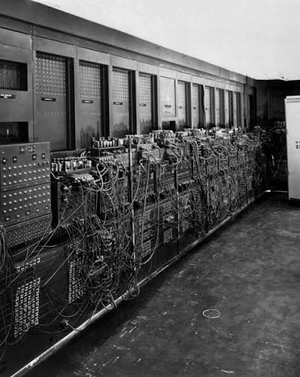
ENIAC (1946): Built to calculate artillery firing tables, it was one of the earliest fully electronic, general-purpose digital computers.ENIAC
Physical Specifications and Computing Capabilities of the ENIAC (1946)
20 accumulators (storing ten 10-digit decimal numbers each)
UNIVAC I (1951): The first commercially produced digital computer designed for business and administrative applications.
UNIVAC I
Physical Specifications and Computing Capabilities of the UNIVAC I (1951)
Category
Characteristic
Details
Physical Specifications
Floor Space
~35.5 m²
Weight
~13 tons
Power Draw
~125 kW
Internal Components
~5,200 vacuum tubes, 18,000 crystal diodes
Primary Storage
Mercury delay line memory (1,000 words of 12 decimal characters each)
Computing Capabilities
Addition / Subtraction
~1,905 operations per second
Multiplication
~455 operations per second
Division
~257 operations per second
Clock Speed
2.25 MHz
Input / Output Method
Unityper (magnetic tape units), punched card converter, electric typewriter
The Von Neumann Architecture (1945-1946)
Formulated by mathematician John von Neumann, this theoretical framework defines the core hardware layout used by modern computers, including PCs, smartphones, and embedded systems.
The architecture of a PC is understood as the way of distributing the different hardware devices so that they interact in the best possible way.
Von Neumann architecture
Core Components
The Von Neumann model divides a computer system into four main functional blocks connected by buses:
Central Processing Unit (CPU): The brain of the computer that processes all data.
Control Unit (CU): Fetches, decodes, and sequences instructions from memory.
Arithmetic Logic Unit (ALU): Executes mathematical calculations (`+`, `-`, `*`, `/`), logical operations (`AND`, `OR`), and comparisons (`<`, `>`, `=`).
Registers: High-speed temporary storage cells within the CPU core.
Main Memory (RAM): Volatile storage holding the current program instructions and active data.
Input/Output (I/O) Unit: Interfaces with external peripherals (e.g., keyboards, displays).
System Buses: Communication pathways that transmit data, memory addresses, and control signals.
Era III: Second and Third Generations (1958–1974)
The shift from vacuum tubes to modern solid-state electronics occurred across two distinct phases.
Second generation: The discrete transistor era (1958–1964)
Prior to this era, first-generation computers relied on thermionic vacuum tubes, which functioned like incandescent light bulbs: fragile, hot, power-hungry, and prone to burning out every few hundred hours.
The invention of the point-contact and bipolar junction transistor at Bell Labs (1947–1951) introduced the first solid-state switch:
Replacing the vacuum tube: Transistors performed the identical electronic task as vacuum tubes (amplification and binary on/off switching) using solid semiconductor materials (initially germanium, later silicon) without requiring a heated filament or vacuum envelope.
Advantages over tubes:
Power consumption dropped from tens of watts per tube to milliwatts per transistor.
Heat dissipation was radically minimized, allowing denser chassis design without extreme industrial air conditioning.
Mean Time Between Failures (MTBF) improved from hours to tens of thousands of hours.
The Bottleneck "The Tyranny of numbers":
Second-generation machines (such as the IBM 7090 and CDC 1604) still used discrete components.
Each transistor, diode, capacitor, and resistor was manufactured as a separate physical part. Engineers had to hand-solder hundreds of thousands of individual copper wires to connect these parts onto circuit boards.
As computers grew more capable, the sheer number of soldered joints created an insurmountable reliability barrier: a system with 100,000 discrete components had hundreds of thousands of potential solder-joint failure points.
transistors evolutiontransistor 14nm
Third generation: Integrated circuits (1964–1974)
The Third Generation did not replace the transistor. Instead, it solved the "Tyranny of Numbers" by replacing the physical wiring between transistors with chemical lithography on a single crystal slab. A frequent misconception is that integrated circuits replaced transistors; in reality, the transistor remained the fundamental building block of computing. The revolution lay in how transistors were manufactured, packaged, and connected: moving from individually wired components to micro-etched, monolithic semiconductor circuits.
Invented independently by Jack Kilby (Texas Instruments, 1958) and Robert Noyce (Fairchild Semiconductor, 1959), the **Integrated Circuit (IC)** unified active components (transistors, diodes) and passive components (resistors, capacitors) into a single continuous substrate.
How the IC transformed the transistor
Monolithic integration: Instead of soldering individual transistors onto a board, dozens (SSI, Small-Scale Integration) and then hundreds (MSI, Medium-Scale Integration) of transistors were diffused and etched directly onto a single slice of silicon.
Photolithography: Microscopic interconnects were deposited chemically (planar process) rather than wired by hand. The physical connection between transistors became part of the silicon die itself.
Speed and physical distance: Because electrical signals propagate at a fraction of the speed of light (~20 cm/ns in copper traces), discrete systems lost processing time just waiting for signals to travel down copper traces. Compressing thousands of transistors into millimeters of silicon shortened signal travel times by orders of magnitude, dramatically increasing clock speeds.
Economic scaling: Batch fabrication meant an entire wafer containing hundreds of ICs, each holding thousands of transistors, could be produced simultaneously, dropping the per-transistor manufacturing cost from dollars to fractions of a cent.
Landmark Systems of Era III
IBM System/360 (1964): Bridged the transition using Solid Logic Technology (hybrid IC modules) and established the first standard mainframe family where software was backward-compatible across different price tiers.
Apollo Guidance Computer (1966): The first major production consumer of monolithic silicon integrated circuits, utilizing thousands of standard dual 3-input NOR gate ICs, proving that micro-circuitry possessed the extreme reliability needed for human spaceflight.
DEC PDP-8 (1965): The emergence of the minicomputer, leveraging smaller footprint electronics to make computing accessible to individual university departments and laboratories rather than just massive corporate datacenters.
Comparison: Tubes vs. Discrete Transistors vs. Integrated Circuits
Parameter
1st Gen: Vacuum Tubes
2nd Gen: Discrete Transistors
3rd Gen: Integrated Circuits (ICs)
Fundamental Switching Element
Thermionic valve (hot filament in vacuum)
Individual solid-state transistor
Micro-etched transistors (many on one die)
Component Interconnect
Heavy copper chassis wiring & tube sockets
Point-to-point soldered PCB copper traces
Microscopic planar photolithographic traces
Primary Failure Mode
Burnout of heated cathodes (~hundreds of hours)
Soldered joint fractures, manual assembly flaws
Silicon manufacturing impurities (solid-state run life in decades)
Transistor Density
0 (Tubes)
1 transistor per physical component
Dozens to thousands of transistors per package
Physical Scale
Room-scale mainframes
Cabinet-sized units
Desktop and compact cabinet minicomputers
Era IV: Fourth Generation & Modern Computing (1974-Present)
The fourth generation of computing is defined by the development of the microprocessor, which integrated the entire Central Processing Unit (CPU) onto a single integrated circuit chip.
The microprocessor & The PC revolution
Integrating all CPU components onto a single chip drastically reduced production costs and physical size while boosting processing speeds.
Personal computers (PCs): In 1981, IBM introduced the IBM PC, bringing computing power out of specialized laboratories and into homes and offices.
Storage advances: Internal hard disk drives (HDDs), floppy disks, and later solid-state drives (SSDs) expanded local data storage capacity.
Network integration: Devices became interconnected through local networks and the Internet, expanding access to information.
Modern architecture enhancements
Modern processors expand upon the classical Von Neumann model to overcome performance bottlenecks and execute instructions faster:
Floating-Point Unit (FPU): A specialized hardware block designed specifically to handle fractional, trigonometric, and logarithmic operations in a single cycle. It used to be made by the ALU, but FPU reduces its processing time in hundreds.
Cache memory (L1, L2, L3): High-speed internal memory layers that store frequently accessed data close to the CPU core to reduce memory latency.
System buses:
Front-Side Bus (FSB): Connects the secondary cache and CPU to the motherboard and main memory (typically 64 bits wide).
Back-Side Bus (BSB): High-speed internal interface connecting the CPU core directly to L1 and L2 caches.
Parallelism & Specialization: Advanced techniques such as instruction pipelining, superscalar execution, hyper-threading, multi-core architectures, and specialized instruction sets (MMX, SSE) allow computers to process multiple instructions simultaneously.
Multicore Processors: Multiple Cores on a Single Chip
A multicore processor packs two or more complete, independent central processing units (called cores) onto a single piece of hardware, typically a single silicon die or a small group of interconnected dies. Instead of running one single core at blisteringly high clock speeds (which produces excessive heat and draws too much power), CPU designers split the work across multiple cores running at efficient frequencies.
How do multiple cores fit and work on a single hardware piece?
Fitting multiple CPU cores onto a single piece of silicon requires three key hardware solutions:
1. Physical Layout on the Silicon Die
Photolithography: Millions (or billions) of microscopic transistors are etched directly into one continuous piece of silicon using light. A modern 4-core, 8-core, or 16-core chip simply etches several complete CPU processing units side-by-side on that same slice of silicon.
Monolithic vs. Chiplets:
Monolithic Design: All cores, memory controllers, and caches are etched onto one single slab of silicon (common in laptops and smartphones).
Chiplet Design: Several smaller silicon tiles (each containing multiple cores) are placed on the same fiberglass substrate and connected via microscopic high-speed bridges (popularized by AMD Ryzen and modern enterprise chips).
2. Shared Memory and On-Chip Interconnects
If cores were completely isolated, they couldn't coordinate. They share space and communicate using an on-chip network:
Layered Caches:
Each core has its own tiny, ultra-fast memory (L1 and L2 caches) right next to its execution pipeline.
All cores share a larger, central memory block on the same die (the L3 cache), allowing them to pass data without having to travel across the motherboard to the main RAM.
Data Highways (Interconnects): Cores are linked together by on-chip microscopic "highways" (such as a circular **Ring Bus** or a **Grid/Mesh network**) that let them swap information in nanoseconds.
3. Coordinated Execution (The Role of the OS)
To the computer's operating system (Windows, macOS, Linux), each hardware core appears as a distinct processor:
The OS task scheduler automatically assigns different applications (e.g., your web browser on Core 0 and a video game on Cores 1–4) to run concurrently.
When working on a single heavy application (like rendering 3D graphics or encoding video), the software splits the job into multiple smaller tasks (called **threads**), allowing all cores to work on parts of the same problem simultaneously.
Component
Role on the Single CPU Die
Individual Core
Fetches, calculates, and executes instructions independently.
Private Caches (L1/L2)
Instant local memory right next to each core.
Shared Cache (L3)
Common pool of memory on the die that all cores read from.
Internal Interconnect
Microscopic high-speed bus connecting all cores to each other and to the RAM controller.
Comparison of computing generations, key technologies, and physical specifications
Era / Generation
Years
Key Technological Aspects
Representative Computer & Physical Specifications
Pre-Generation
1833-1944
Transition from mechanical to electro-mechanical computing.
Introduction of foundational units: Input, Memory (Store), Control Unit, ALU (Mill), Output.
Implementation of punched cards for data input.
IBM Harvard Mark I (1944)
Dimensions: 17 m long × 2 m high
Weight: 70 tons
Components: 700,000 moving parts
Speed: Addition < 1s, Multiplication ~6s
1st Generation
1946-1958
Built using vacuum tubes.
Large physical footprint, high power draw, complex maintenance.